



If you’re using AI Max and performance is slipping, or you just want to know if AI Max is earning its budget, it’s time to take action. This guide shows you how to audit your AI Max campaigns effectively to optimize performance and maximize efficiency.
Introduction
It’s normal for campaign changes to affect your results. So if you’ve been running AI Max for a couple of weeks and things look a little different to usual, that might be expected. But if you’re still noticing problems after a few months of using AI Max — such as CPAs drifting upwards despite static conversions, or a rise in unresponsive leads — it’s time to audit your AI Max campaigns.
But you can’t just use generic PPC audit techniques for AI Max. Rather than being a standalone campaign type like Performance Max, AI Max is a unique automated featureset that layers on top of your existing Search campaigns. So it requires a specialized approach.
An AI Max audit involves confirming which features are enabled, setting a baseline against standard Search campaigns, and reviewing which queries and landing pages AI Max served. You’ll also need to measure invalid traffic (IVT) by campaign type, test conversion quality, and decide how to proceed to maximize your performance.
This last point isn’t as easy as switching off AI Max if it’s underperforming. Starting in September 2026, Google is automatically upgrading more campaigns to AI Max, with the full rollout scheduled for February 2027. So if your campaigns are eligible, you could be pushed onto AI Max within the next few months.
Below, you’ll find a clear 7-step framework for auditing AI Max campaigns, see the high stakes behind the September upgrade wave, and discover why it’s important to audit your AI Max campaigns now rather than waiting until after Q4.
Why AI Max needs its own audit process
Standard PPC audit frameworks work well for non-automated campaigns. But AI Max is an automated featureset that uses AI to serve your ads for a broader range of queries and choose the most appropriate landing page. This can result in genuine new demand, which is exactly what AI Max is supposed to do. But you have much less control over who sees your ads and where they’re sent — and most audit checklists gloss over these points.
Using our tailored AI Max audit checklist helps you reduce the risks of using AI Max, as well as uncovering common mistakes AI Max users tend to make. Plus, find out how AI Max is affecting invalid traffic rates in your campaigns, and how to reduce incremental waste without compromising on genuine additional reach.
The AI Max audit framework
This 7-step AI Max audit framework breaks the audit process down into actionable steps, improving visibility into your performance so you can optimize your automated campaigns.
1. Check inventory settings
What to do first: Check which Search campaigns have AI Max enabled, and which features within AI Max have been switched on: search term matching, text customization, and final URL expansion.
Why it matters: Each AI Max setting is optional. Switching them on/off can have a big impact on campaign efficiency.
Where to look: Click Settings in the Campaigns menu, then select the campaign you want to audit. Select AI Max in the section menu and check if the toggle is on. If it’s on, search term matching is automatically enabled. See whether text customization and final URL expansion have also been selected.
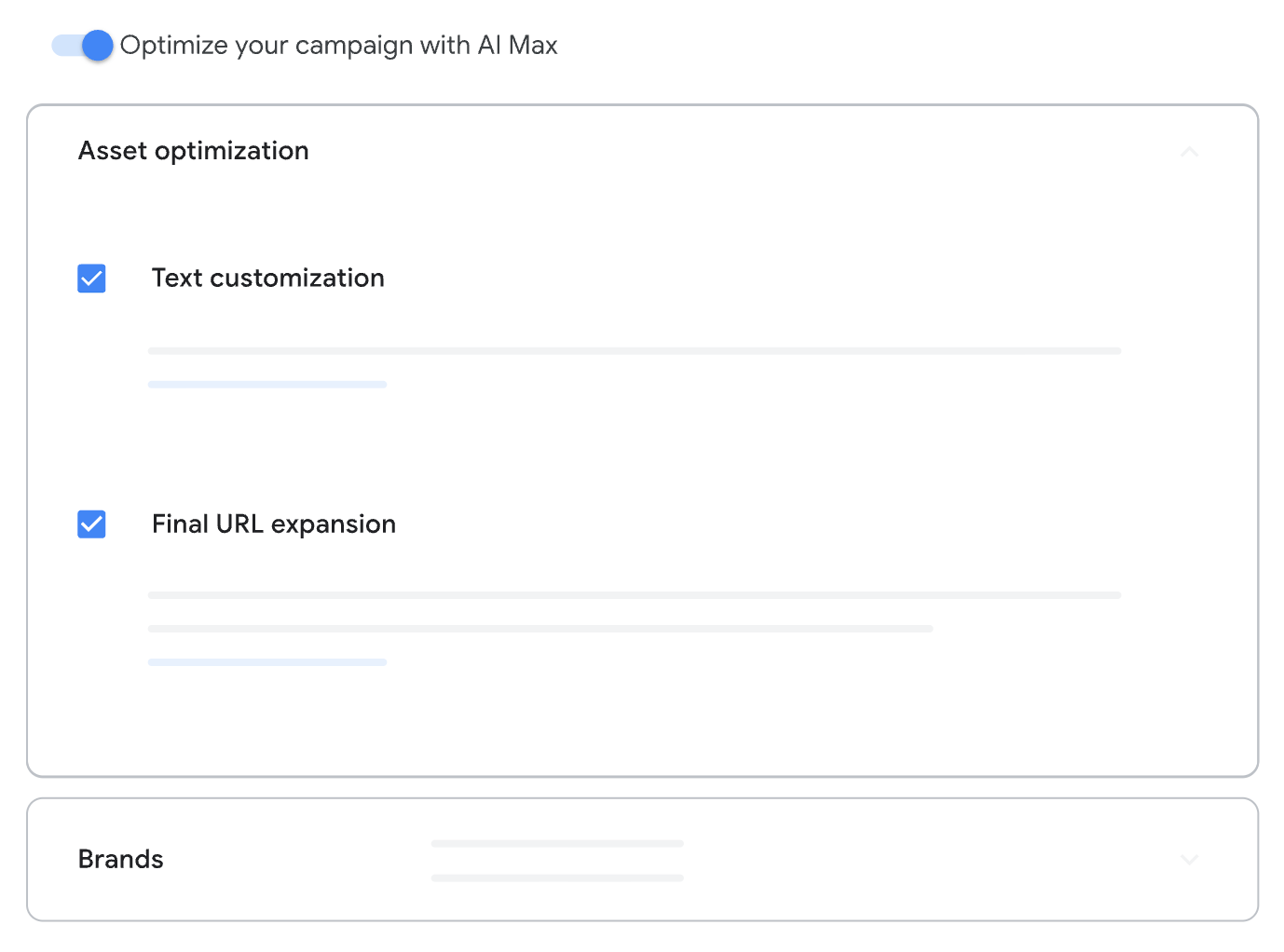
What good looks like: All settings match what you expected. AI Max campaigns have been selected deliberately.
Red flag: Inventory settings don’t match your expectations — they may have been enabled by an automatic upgrade rather than a deliberate choice.
What to do next: Flag any campaigns with unexpected inventory settings for priority audit.
2. Set a baseline
What to do first: Compare AI Max performance against standard Search performance within the same account over the same time period. (Lunio’s AI Max study uses these same guardrails, keeping the comparison as fair as possible.) Measure CPA, CVR, conversion volume, conversion quality, and invalid traffic rate.
Why it matters: Setting a baseline lets you compare results with and without AI Max, so you can see how automation is affecting your performance.
Where to look: The search terms report provides most of the in-platform metrics you need to set a baseline. A third-party traffic verification platform like Lunio will give you the most accurate IVT baseline.
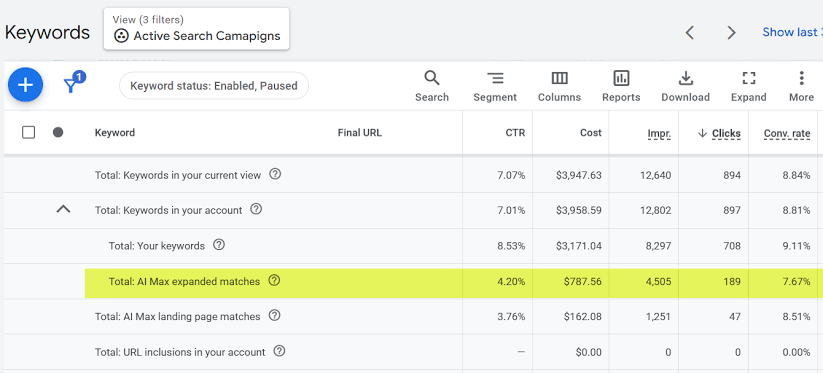
Source: Adalysis
What good looks like: AI Max outperforms standard Search on all key metrics, ensuring the automation layer is providing valuable additional reach without compromising conversions or conversion value.
Red flag: Higher levels of invalid traffic in AI Max campaigns; higher CPAs in AI Max campaigns (without generating additional valuable leads or visitors); more conversions of lower quality or value in AI Max campaigns.
What to do next: Record the key baseline metrics and start auditing queries.
3. Audit queries
What to do first: Check which specific queries AI Max actually served against in the search terms report. Look for any queries that are irrelevant or informational, such as queries linked to careers, support, or competitors. Additionally, compare branded vs non-branded queries.
Why it matters: AI Max is designed to broaden your reach, but in doing so it can stray into unwanted or non-commercial areas. This hikes up your spend without actually generating valuable new users, and can increase your exposure to IVT.
Where to look: Use the ‘Search terms and landing pages from AI Max’ filter in the search terms report. Bear in mind that a certain share of search terms aren’t visible in Google’s reports, so you may not get the full picture.
What good looks like: AI Max matches for queries that provide genuine new commercial opportunities. These matches wouldn’t have been captured by existing exact or phrase match campaigns.
Red flag: AI Max matches for unwanted queries or those that standard Search campaigns would have served ads for anyway.
What to do next: If AI Max has already been running for 2+ weeks, review your negative keyword lists to remove unwanted queries for future targeting. Tighten up your brand settings and location controls. Try to avoid making changes within the first 2 weeks to allow for optimization time.
4. Audit final URL expansion
What to do first: Check which landing pages received paid clicks that you didn’t nominate. In particular, look for out of stock or discontinued product pages, thin or outdated content, and non-commercial pages like blog posts or support pages.
Why it matters: Sending paid referrals to irrelevant or outdated pages will drain your ad budget without contributing to potential high-quality conversions or creating valuable reach.
Where to look: Check the landing pages report to see if specific URLs were chosen by AI Max (shown as ‘automatically selected’ rather than ‘advertiser selected’). Alternatively, look at the 'Expanded final URL assets' tab in the campaign-level asset report to see asset and URL combinations.
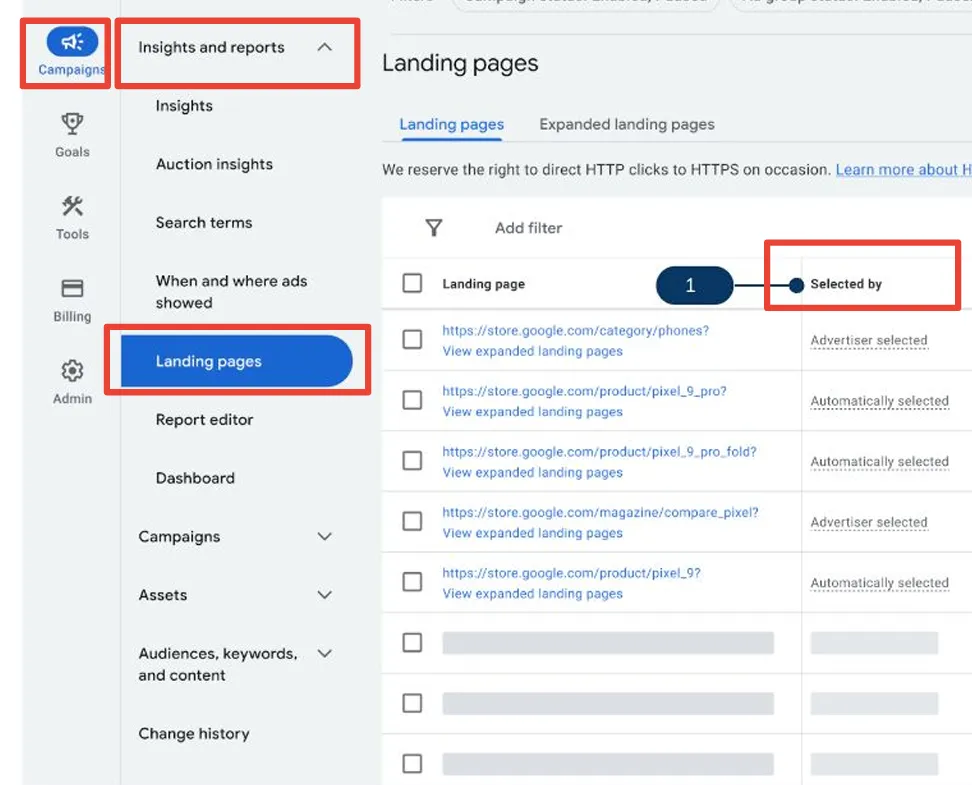
Source: Midsummer Agency
What good looks like: AI Max selects and serves highly relevant, commercial landing pages only.
Red flag: AI Max selects and serves a high number of irrelevant pages or pages with no conversion path, meaning you’re paying for users who are unlikely to convert.
What to do next: Add URL exclusions to prevent final URL expansion into unwanted pages. Where the risk outweighs the benefits of additional reach, you might choose to restrict expansion to nominated URLs only.
5. Measure traffic quality by campaign type
What to do first: Separate out IVT data from AI Max versus standard Search, and check for typical signs of invalid traffic. These include clicks from untargeted locations, high bounce rates with near-zero dwell time, and junk form fills contaminating your CRM data.
Why it matters: High invalid traffic rates compromise campaign performance, and AI Max may put your campaigns at higher risk. 2026 Lunio data analysis found that IVT in AI Max-enabled campaigns rose by +114% over a nine month period, while decreasing by -17% in standard Search campaigns over the same time.
Where to look: An independent invalid traffic protection solution will give you the most reliable insights. Lunio segments IVT data by campaign type so you can compare AI Max vs standard Search IVT rates. Note that however you monitor IVT rates, you should report by campaign type, as account-level averages can hide IVT rate differences in AI Max vs standard Search.
What good looks like: Similar levels of IVT in AI-Max enabled and standard Search campaigns (although if both campaign types are affected by high volumes of IVT, this is still a problem).
Red flag: AI Max-enabled campaigns report much higher levels of IVT. Broader reach often results in higher exposure to invalid traffic.
What to do next: Activate invalid traffic detection across your Google Ads campaigns. Lunio detects IVT at the source, and monitors 100% of your traffic. So there’s no need to claim credits or rely on traffic sampling that allows IVT to filter through.
6. Test conversion quality
What to do first: If you’re a lead gen advertiser, review the relevant conversion data in your CRM. Check your sales-qualified lead rate, close rate, lifetime value, and spam lead share. Retail advertisers should check for low margin orders, or orders with a high cancellation or return rate.
Why it matters: High volumes of low quality conversions can push up your CPAs without actually delivering meaningful revenue or improving ROAS. So conversion quality may matter more than conversion volume.
Where to look: Lead gen businesses should check Google Ads data against their CRM data. Retail customers can check Google Ads data against GA4 or ecommerce platform data.
What good looks like: Conversion quality is in line with your KPIs and standard Search performance.
Red flag: Conversion quality has dropped in AI Max-enabled campaigns compared with standard Search over the same timeframe.
What to do next: Analyze conversions for genuine incrementality: did AI Max reach genuinely valuable new demand, or claim credit for existing demand? Assert whether the incremental value generated exceeds the incremental waste.
7. Decide on your next AI Max play
What to do first: Analyze your findings and decide whether to keep AI Max running as is, set some additional constraints, or roll it back to standard Search only. Document your decision, noting features enabled, brand settings, locations, text guidelines, URL controls, and any current negatives or exclusions.
Why it matters: What you decide to do next can have a big impact on future campaign performance. It also gives you a contextual baseline for future audits so you can continually optimize AI Max results.
Where to look: Review all collated data.
What good looks like: Data-driven decision based on your current performance.
Red flag: Changing AI Max settings without a full audit trail to support your decision.
What to do next: Schedule your next audit (before you hit peak season).
September 2026 AI Max changes — and how to prepare
AI Max isn’t yet mandatory for Search advertisers, but changes are coming that will push more campaigns into AI Max mode. Search campaigns that use automatically created assets and campaign-level broad match settings will be automatically upgraded to AI Max in September 2026.
Dynamic Search Ads (DSA) campaigns will be automatically upgraded to AI Max from February 2027, with no new DSA campaigns created from January 2027.
Voluntarily switching to AI Max ahead of time means you have maximum control over how your AI Max campaigns are configured. If you wait for Google to auto-upgrade your campaigns, they’ll apply the default settings.
Whether you make the leap yourself or wait for the auto-upgrade, the timing isn’t ideal. Many retail businesses are heading into peak shopping season, leaving the year’s highest budgets exposed to the risks of AI Max. But auditing your traffic quality now is still likely to be cheaper than reconciling it after Q4 ends.
Lunio client Represent saw a 12.86% conversion rate increase during their peak spending period by activating Lunio to remove IVT from their automated campaigns. Joe Seabridge, paid media manager at Represent, said:
"As the marketing sector continues to evolve, more spend is inevitably going to automated campaign types. With less control over where budget actually gets spent, Lunio acts as a guardrail, ensuring we’re feeding higher quality traffic into our campaigns to optimize against higher-intent visitors."
Retail is most affected — so should other advertisers worry?
Retail advertisers have adopted AI Max more quickly than advertisers in lead gen or high CPC fields, thanks to its feed-driven, automation-friendly nature. In fact, Lunio data from Q4 2025 to Q2 2026 found that despite a fall in total Search volume, retail AI Max adoption rose across the nine-month period, accounting for around a third of Search clicks in Q4 2025, and rising to 55% by Q2 2026.
With longer sales cycles and higher CPAs, regulated high CPC sectors and lead gen advertisers are less likely to embrace the broader reach AI Max is designed to generate. But no advertisers are exempt from the AI Max rollout, so even if you’re not affected yet, you could be very soon. Lead gen accounts often use automatically created assets, campaign-level broad match, and Dynamic Search Ads.
The symptoms of contaminated campaigns look different for lead gen businesses. Instead of low margin orders, you could see an increase in junk leads and polluted CRM data. But you can still audit your AI Max campaigns using our framework — just use the specific markers of conversion quality that matter to your business.
How Lunio helps you audit AI Max traffic quality
Google offers fairly limited visibility into your traffic quality. So if you’re relying on in-platform data to monitor IVT, you’re probably not getting the full picture — especially if you’re using AI Max.
Our AI Max invalid traffic data showed that while AI Max started approximately one third cleaner than standard Search, nine months later it was 72% more corrupt. So if you’re not monitoring your IVT rate on this channel, it could seriously compromise your campaign performance.
Lunio gives you conclusive insights into your IVT rate across your Google campaigns. You can segment traffic reports by campaign type, allowing you to assess AI Max independently of standard Search and see exactly how much IVT each channel is generating. New Lunio users can get a free 14-day traffic audit, so you can measure your traffic quality and set an IVT baseline before the September upgrade rolls out.
And if you opt to activate Lunio after your trial, our traffic verification software will monitor 100% of your traffic, blocking bots and other fake users at the source, before it can contaminate your data and drain your ad budget. Our clients see results almost instantly — shelving and racking retailer BiGDUG saved £18,266 in their first month of using Lunio.
Audit your AI Max traffic before the September upgrade: start your free 14-day traffic audit from Lunio.
FAQ
Find out more about auditing AI Max campaigns in these frequently asked questions.
1. What is an AI Max audit, and how often should you run one?
An AI Max audit is an important process designed to optimize your Search campaigns. It evaluates the performance of your AI Max-enabled campaigns by setting baseline metrics, auditing queries and landing pages, and measuring traffic quality so you can decide whether to retain, constrain, or switch off AI Max.
Ideally, you should audit your AI Max campaigns every 3 to 6 months to ensure regular campaign maintenance and optimization.
2. What is the easiest way to audit AI Max campaigns?
The easiest way to audit AI Max campaigns is to follow an established framework that breaks down the AI Max audit process into manageable steps. You’ll need access to your Google Ads reports to audit queries and landing pages, and an independent traffic verification platform like Lunio to reliably assess traffic quality.
Lunio’s traffic quality reports are easy to segment by channel, giving you clear comparable insights into your AI Max vs standard Search traffic quality.
3. Is AI Max the same as Performance Max?
No. AI Max is an automated featureset that can be applied to standard Search campaigns, enabling automated search term matching, text customization, and final URL expansion. Performance Max is an automated campaign type that lets you automate advertising across Google’s ad channels, including Search, YouTube, Gmail, Display Network, and more.
4. Can you opt out of AI Max or the September auto-upgrade?
If you run standard Search campaigns without automatically created assets or campaign-level broad match settings, you won’t be automatically upgraded to AI Max in September. Your standard Search campaigns will continue to run without AI Max, unless you manually switch it on.
Advertisers running DSAs will be automatically upgraded to AI Max in February 2027 rather than September 2026. You can’t opt out of the auto-upgrade, although you can manually switch AI Max off, in which case your campaign will revert back to manual keyword-driven Search campaigns.
5. Why did my CPA or lead quality get worse after enabling AI Max?
There could be a number of reasons that you’ve seen a rise in CPAs or drop in lead quality after enabling AI Max, including:
- AI Max is expanding your reach into noncommercial audiences, who generate form fills but have no conversion value.
- AI Max is generating higher volumes of low quality traffic, increasing CPAs without delivering a meaningful return on your ad spend.
- AI Max increases your exposure to invalid traffic, leading to higher volumes of non-converting traffic interacting with your ads.
Conducting an AI Max audit can uncover the reason(s) for your lackluster AI Max performance.
6. How do you see which search terms and landing pages AI Max is using?
Access the search terms report via your Google Ads account. At the top of the data table, select the search terms drop-down and choose 'Search terms and landing pages from AI Max' to view this data.
7. Does AI Max increase invalid traffic?
In our 2026 Global Invalid Traffic Report, we found that the average IVT rate increased by 35% after enabling AI Max. Campaigns without AI Max maintained an average IVT rate of 3.7%, while the average IVT rate in AI Max-enabled campaigns rose to 5%. Lunio’s data science team analyzed the results, accounting for seasonality and other trends, and indicated that switching on AI Max was the most likely cause of the increase in IVT.

Table of Contents
On average, 8.51% of your ad budget is wasted.
But that number can be much higher. Find out how much you're spending on bot traffic.