



Every paid search manager has experienced the same sinking moment at one point or another:
Conversions spike, the ROAS chart looks beautiful for about four days… And then the spreadsheet stops making sense.
The sales team hasn't noticed anything, revenue hasn't moved. Then you discover that somewhere, behind all of it, a tag is firing twice.
The frustrating part isn't the bug - bugs get fixed in an afternoon. The frustrating part is what happens after the fix, when your dashboards look normal again but your bids are still hunting for an audience that was never real in the first place.
Smart Bidding is an exceptionally obedient system, (even more so after August 17th 2026) - but here, obedience is the problem.
So - to unpack exactly how that happens (and what to do about it), we held a Smart Bidding masterclass with Heidi Sturrock (Lead Google Strategist at OMG Commerce, who has spent 25 years in paid media and writes some of the sharpest practical material out there on conversion data hygiene), and Scott Carruthers (Senior Paid Search Director at Journey Further, who audits accounts at scale and has built an agency-wide guardrail stack to catch exactly this class of problem before it compounds).
Watch the full session on-demand here, or keep reading for the written rundown:
Timestamps:
0:00 - Introduction
3:33 - Agenda and audience poll: one month on from August 17
6:12 - First impressions of the Aug 17th update
8:52 - How Smart Bidding actually learns
14:15 - How fast it can go wrong: £10,000 in under an hour
16:15 - The bad data hall of shame
23:55 - Why fixing the tag doesn't fix the model
27:28 - The bad data that doesn't announce itself
28:43 - Applying data exclusions properly
34:32 - A circuit breaker, not a band-aid
38:38 - Guardrails, alerts and catching it early
43:03 - The August 17 Smart Bidding update
46:34 - What everyone expected vs. what happened
49:31 - Should you lower your ROAS target?
52:32 - Your Monday morning: where to start
54:58 - Live audience Q&A
How Smart Bidding actually learns
Before anything can go wrong, it helps to be precise about what's going right.
Smart Bidding reads a large set of contextual signals in every auction: the device someone is on, where they are, the time of day, how they've been browsing. Heidi's framing is that it's constantly watching who crosses the finish line and building a picture of your ideal customer from those patterns.
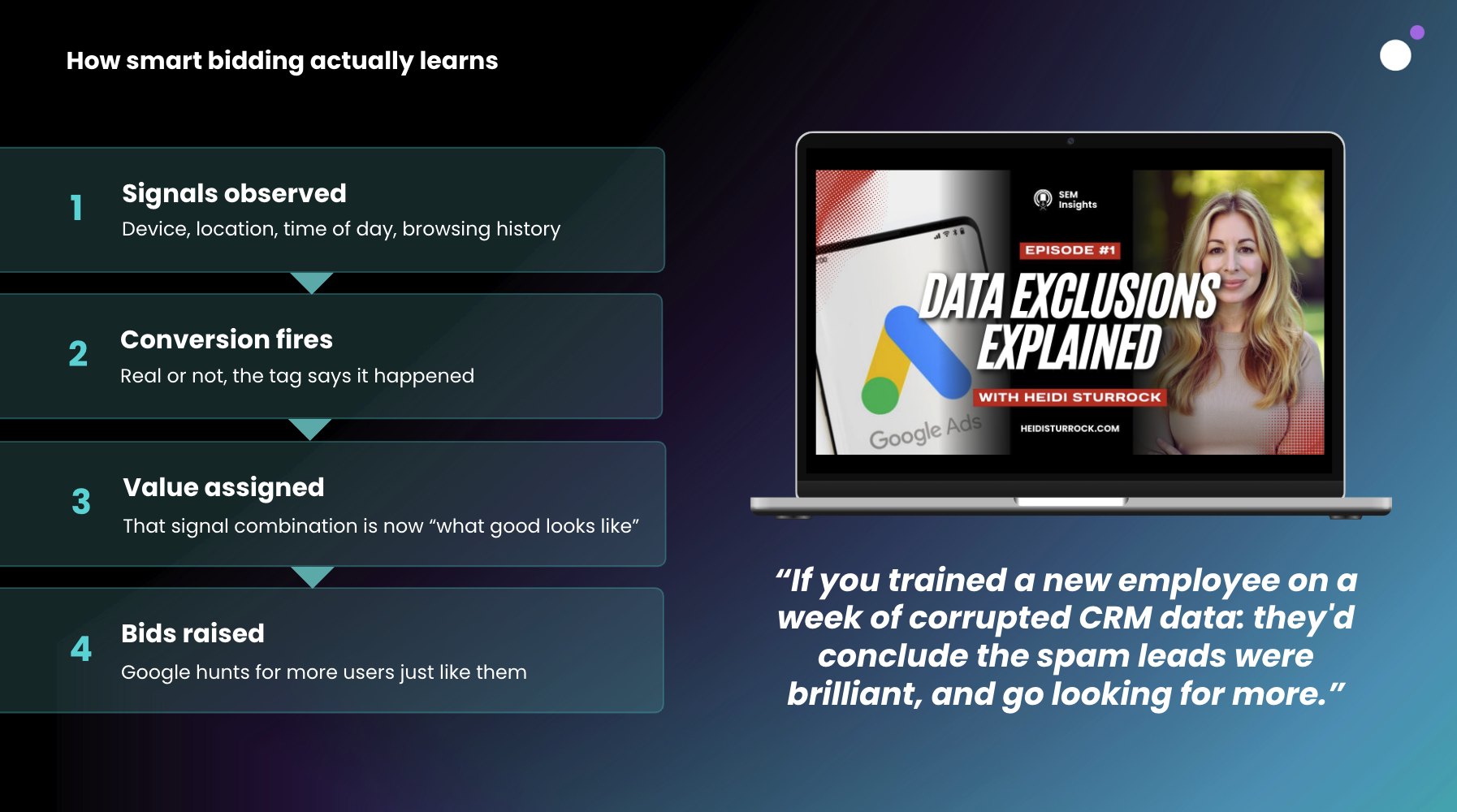
When a conversion fires, that combination of signals gets a value attached to it, and the system starts spending more to find people who look the same.
Heidi made a point here that's worth holding onto, because it catches a lot of people out: when CPCs or CPMs start creeping up after a bid strategy change, that isn't automatically a red flag. If conversion rate, CPA and ROAS are all improving alongside it, the algorithm is usually just buying into more expensive auctions because that's where the better customers are.
The failure mode sits one step earlier in the chain. At step two, a conversion fires. Not a real conversion, necessarily. Just a conversion, as far as the tag is concerned.
"Smart Bidding is exceptionally powerful, but it possesses absolutely no common sense. It cannot detect context or read the room."
— Heidi Sturrock
Heidi's analogy for this is training a new employee. Feed them a week of corrupted CRM data and they'll conclude the spam leads were excellent, then go looking for more. The version she sees most often in real accounts is less dramatic and more mundane: an ecommerce business whose actual objective is revenue, with an account quietly optimizing toward newsletter signups.
"The algorithm doesn't know that newsletter signups aren't as important to you as actual sales. So it starts looking for people who are really great at signing up for newsletters, but maybe not buying anything from you."
— Heidi Sturrock
You can have a flawless account structure, the right bid strategy and clean campaign settings, and still be pointing all of that machinery at the wrong finish line.
The bad data hall of shame
Scott's contribution to this section was a cautionary tale he has told before on the PPC Live podcast, and would probably prefer not to tell again. But unfortunately for Scott, we covered it regardless.
Early in the Smart Bidding era, he set a Target CPA strategy live on a client account and watched it spend the entire daily budget, north of £10,000, in under an hour.
When asked what his biggest learning from that was, this was his response:
"The biggest thing I've learned is not to bring up ten-year-old mistakes on a podcast."
— Scott Carruthers
Fair enough. But, more seriously - the tactics have changed several times since then, but the principles he took from it haven't.
Look at the historic conversion data before you change a bid strategy, understand what target you're actually setting against that history, and know what guardrails are in place to contain it if the change goes sideways. Spend still runs away today. It just tends to do it more quietly.
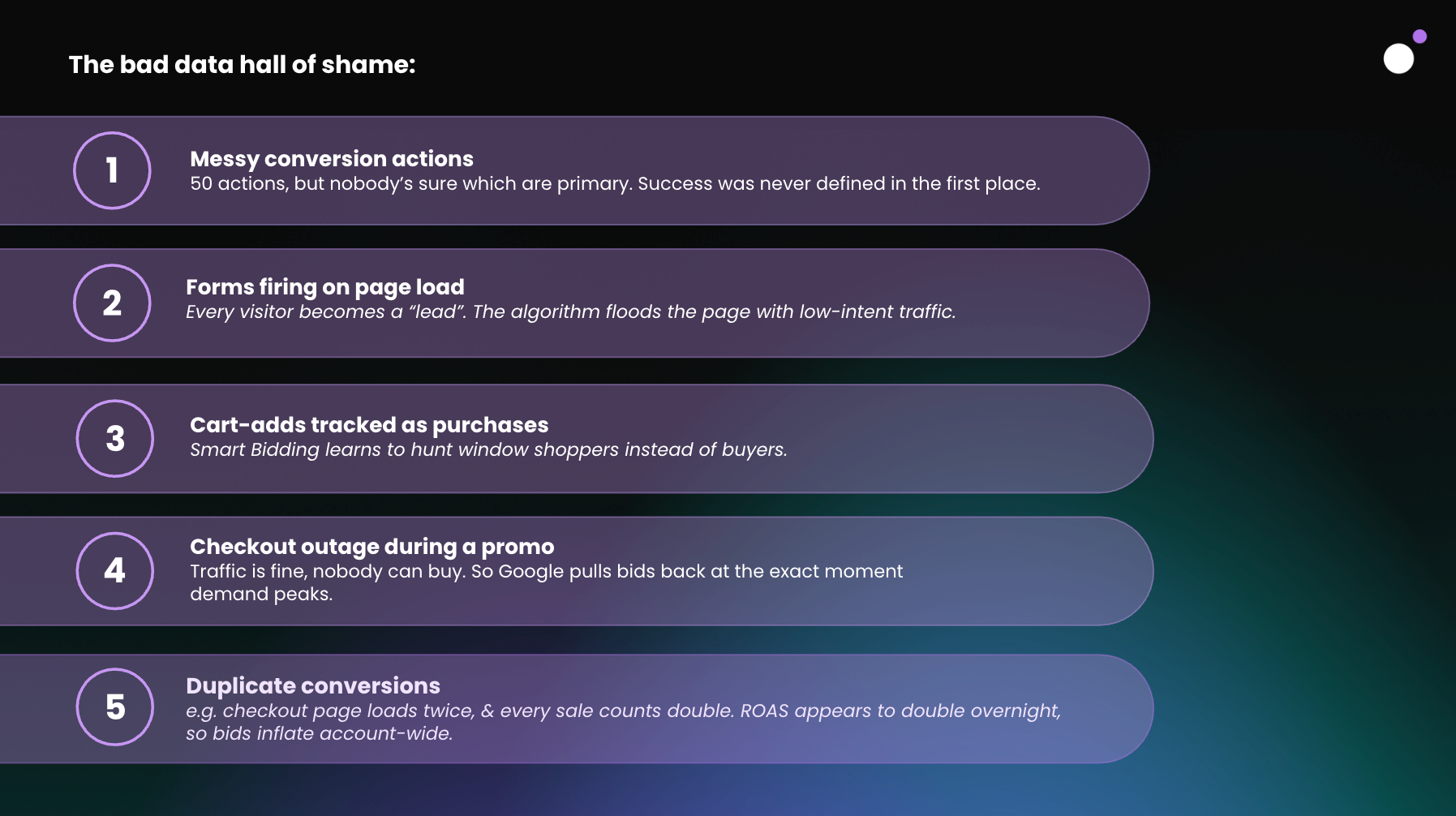
Most of the five recurring failure modes are tracking problems: duplicate conversions from a checkout page that loads twice, lead forms firing on page load, cart-adds counted as purchases, a checkout outage during a promo that convinces Google demand has collapsed at the exact moment it peaks. The fifth one is different, and both guests treated it as the root cause of the other four.
Conversion action setup, Scott argued, is now arguably the single most important thing in a Google Ads account, because it's one of the last levers you fully control. Keyword targeting has been steadily loosened by broad match, Performance Max and AI Max. What's left is the definition of success itself.
"The one signal we do still have control over, that we can use to tell Google how we want that targeting to work, is that success metric."
— Scott Carruthers
The last account Scott audited had 57 conversion actions in it. Thirteen had been removed, leaving 44 live.
His test for a clean setup is two questions: does every conversion action tie back to a business objective, and can a human being open the account and understand what they're looking at? Naming conventions, primary and secondary assignment, custom goals, conversion value rules and new-customer weighting all add capability, and all add ways to lose the thread.
Heidi's version of the same problem shows up in the reporting. Micro conversions like add-to-cart are a legitimate tool for warming up a campaign with a long sales cycle or a high ticket price. The mistake is applying them at account level rather than to the specific campaign that needs them.
She described auditing accounts where sales volume looks impressive but average order value is inexplicably low. The AOV isn't low because customers are spending less. It's low because conversion value from real sales is being divided across a pile of add-to-carts that every campaign in the account is now picking up. Her advice, for anyone running more than one conversion action: check they're applied only to the campaigns they're relevant to.
And, for the record, she opened that answer by telling the audience not to feel bad about any of it. In 25 years she has seen it happen in some of the most sophisticated accounts around.
Why fixing the tag doesn't fix the model
This is the part most teams underestimate. You find the bug, you fix the bug, the numbers normalize, and the incident gets closed. Weeks later, costs are still inflated and nobody can work out why.
Heidi walked through a double-firing tag case where the client fixed the issue in three days. Cost stayed elevated well past that. The reason is that Smart Bidding is a predictive system working from historical patterns, and it typically looks back across roughly the last 30 days to decide what to chase next. Three days of doubled conversions is a very loud signal inside that window.
"The algorithm got super excited. It was like, look at all these new customers I'm getting for you. That's a really strong signal, and the algorithm is going to latch on to that.
— Heidi Sturrock
Fixing the tag stops new bad data arriving. It does nothing about the bad data already sitting in the training set. The model keeps integrating the fix slowly, in proportion to how much clean data accumulates alongside the corrupted period, which is why performance can stay strange for weeks after everyone has declared the incident resolved.
That gap between "fixed" and "recovered" is the entire reason data exclusions exist.
"Imagine putting a little blindfold on your employee. Don't even look at what we trained you on during those days." — Heidi Sturrock
Data exclusions: a circuit breaker, not a band-aid
A data exclusion tells Smart Bidding to ignore a specific window when learning. It blinds the training layer for a chosen date range, it can be set per campaign so you can be surgical about it, and it leaves your reports and historical dashboards exactly as they were. You'll find it under Tools → Budgets and bidding → Adjustments → Exclusions.
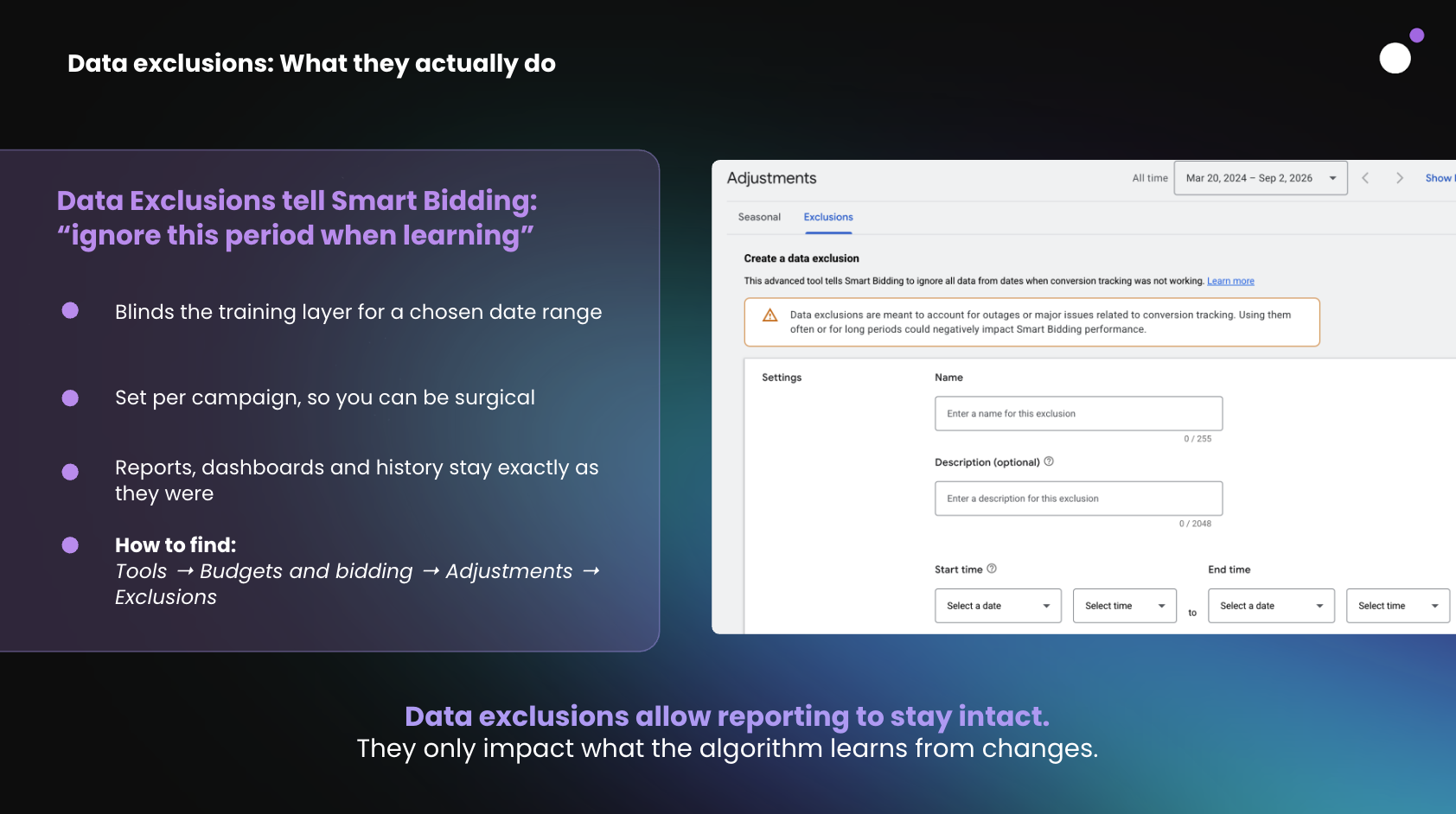
Applied badly, they cause more damage than the incident did. Heidi's process runs in a fixed order.
First, don't panic, and establish the parameters. Which days were affected, and which campaigns did the broken conversion action actually touch? Then scope the exclusion to those campaigns only. Blinding the entire account punishes campaigns that were feeding perfectly good signals the whole time.
Second, extend the window backwards. This is the step people skip. Conversions credit earlier clicks, so check your time lag report and push the start date back far enough to cover the clicks that produced the corrupted conversions. A bug you caught on Friday probably needs Monday's clicks inside the exclusion.
Third, document it. Your reports will still show the spike or the crash, because exclusions change what the algorithm learns from, not what the platform displays. Heidi raised this as a recurring annoyance in quarterly and year-end reviews, where teams spend an hour trying to explain a period that was never real. Annotate it while you remember what happened.
Two weeks is the practical ceiling. The feature was built for short disruptions, not for months of history, and past that point you're starving the algorithm rather than protecting it.
"If you're constantly having to pull out and use this tool, the real problem is your measurement."
— Heidi Sturrock
There's also a request Heidi gets constantly and always refuses: excluding a period simply because performance was poor. A flopped sale is not a tracking failure.
"Bad performance is still a key learning for the algorithm. It tells the algorithm what not to look for, because it's not meeting your target."
— Heidi Sturrock
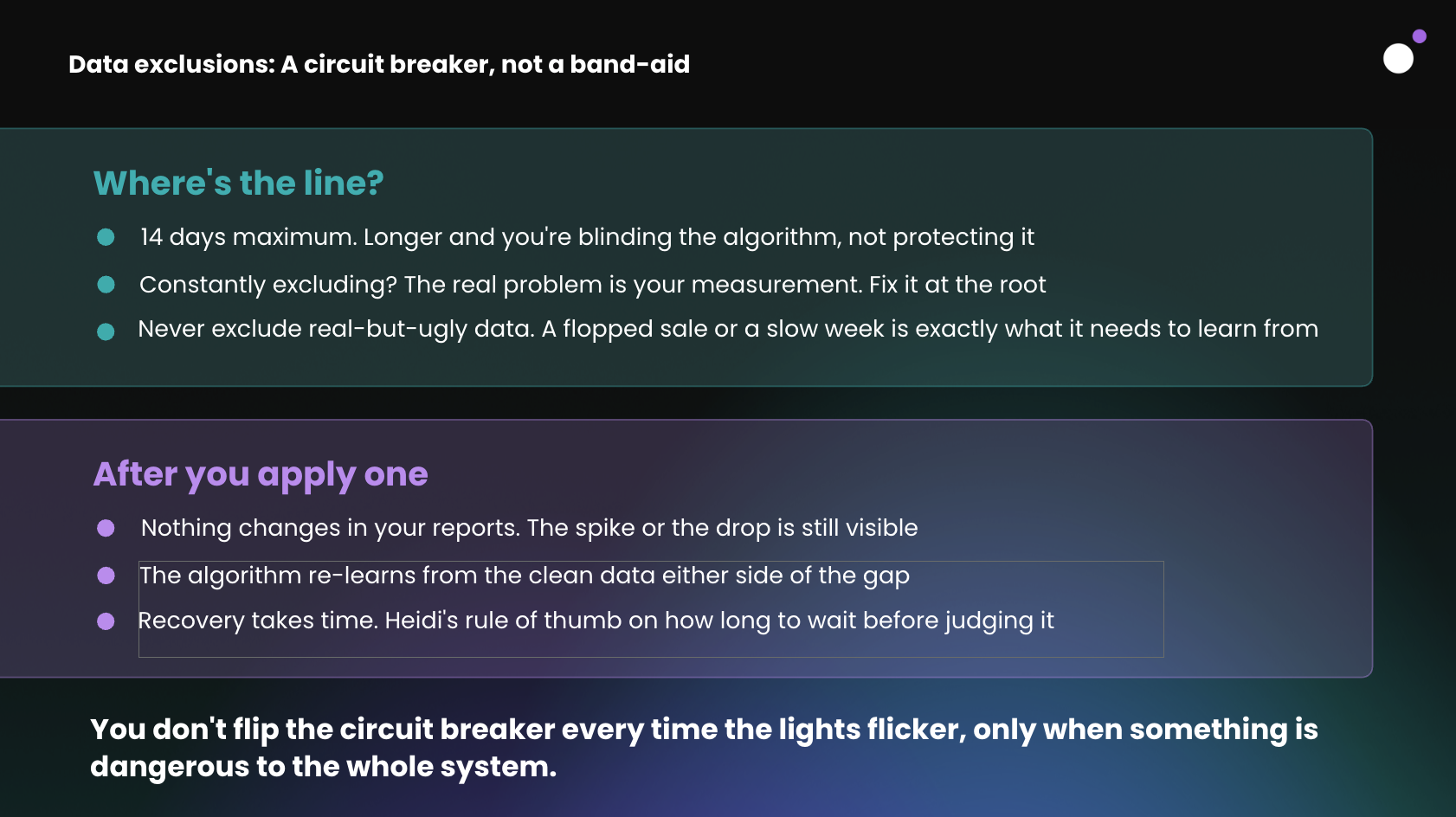
As for recovery, expect a few wobbly weeks. Accounts with high conversion volume relearn quickly, but the algorithm is rebuilding a baseline from a smaller pool of data, and the temptation to intervene is strongest exactly when intervening does the most harm. Heidi's advice is to carry on with business as usual and let it settle rather than stacking changes on top of an account that's already recalibrating.
How to catch it before you need the circuit breaker
Exclusions are what you reach for once something has already gone wrong. The better outcome is a corrupted window that never gets long enough to matter.
Two free scripts do most of the heavy lifting here, and both take under ten minutes to install with no coding: Nils Rooijmans' daily budget overdelivery alert, and Google's own account anomaly detector, which compares today's performance against the same day of the week in previous weeks. The anomaly detector covers conversions as well as clicks and cost, which is what makes it useful for spotting tracking breakages rather than just overspend.
At Journey Further, Scott's team has built that principle out considerably. Clients get dashboards that update daily rather than a monthly review, and the guardrail stack now runs to more than 20 alerts, with thresholds configurable per account. Some of it is obvious: spend spiking hour over hour, conversions dropping to zero. The per-account thresholds matter more than they sound, since an account that gets a handful of conversions a day will otherwise fire a zero-conversion alert every hour of the night.
The most quietly useful example he gave was a weekly check that flags any new campaign set to "presence or interest" rather than "presence". Sometimes that's deliberate. Often it's an accident nobody spots until traffic starts arriving from countries the client doesn't serve.
"Think about the things you're always checking for yourself. Take that off your mind, get something built to flag it up and let you know when it's happening."
— Scott Carruthers
For a solo in-house marketer, the entry point is lower than most people assume. Automated rules inside Google Ads will email you when a defined event occurs. Start with the one alert that would have caught your last unpleasant surprise.
August 17: your target is a goal now, not a ceiling
The biggest Smart Bidding change in years landed a month before we recorded, and it connects directly to everything above.
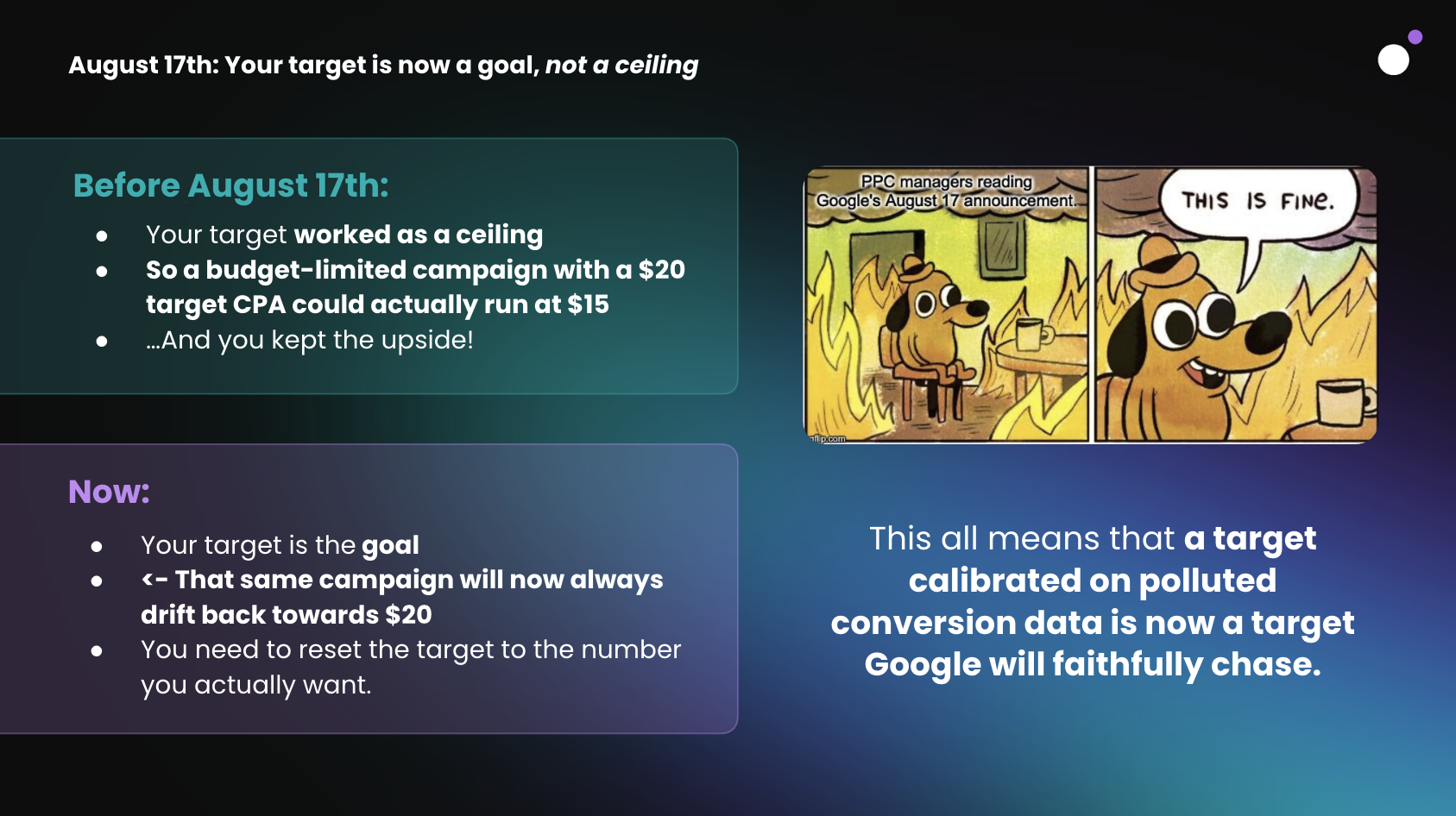
Before August 17, your target behaved as a ceiling. A budget-limited campaign with a $20 target CPA could comfortably run at $15, and you kept the upside. Now the target is the goal. That same campaign will drift back up toward $20 unless you reset it to the number you actually want. Your target has become a stronger signal than it has ever been, which means a target calibrated on polluted conversion data is now a target Google will faithfully chase.
A month on, both guests reported less drama than expected. Scott's accounts saw minimal performance change, which he attributed to targets that were already aligned to business objectives rather than set as negotiating positions. Heidi saw the same in accounts with deep conversion history, and more disruption in smaller accounts where there simply isn't enough volume to set a statistically meaningful target in the first place.
Her team's approach was methodical: audit every budget-limited campaign, compare the stated target against actual performance over the last full conversion cycle, and where the two had drifted apart, reset the target to reflect reality. Campaigns treated that way came through the change with very little disruption.
Scott's more interesting observation was a second-order effect. Google promised greater consistency and less volatility, and delivered it. The trade-off arrived with it.
"With greater consistency, with less volatility, comes slower reacting accounts, or slower reaction to those target changes."
— Scott Carruthers
Which is fine if your targets track your business objectives, since those shouldn't change weekly. It's considerably less fine if you have a client who likes to push targets around every Monday morning.
The pre-change consensus was to nudge CPA targets down and ROAS targets up, and to read between the lines of Google's announcements. Optmyzr's modeling predicted a median conversion loss of around 9% for affected campaigns, rising to 56% at the 90th percentile.
What actually happened, at least in the behavior Mike Ryan documented, is that advertisers raised their ROAS targets more or less across the board. Which is the instinctive move, and possibly the wrong one.
On the Smarter Ecommerce podcast, Chris Scharmueller made the contrarian case: the smartest available move right now might be to lower your ROAS target and take market share while everyone else pulls back. We put that to both guests.
Heidi's read was that it's a legitimate play if you have the room for it. Lower your ROAS target below your realized return and you'll likely buy more volume at some cost to efficiency, which is a fine trade if your margins can absorb it. But she wouldn't do it wholesale.
"If you want to play around with your ROAS or CPA targets, do an experiment instead of just changing everything."
— Heidi Sturrock
Scott was blunter about the advice itself:
"The key word in everything Heidi just said there is to test. I think the advice from Mike and Chris is a little too broad, and you wouldn't just take it at face value."
— Scott Carruthers
Final thoughts
The main thread running through the whole session is that Smart Bidding's competence is now the thing that makes bad data dangerous.
It's very good at pursuing whatever you define as success, it looks backwards to decide what to do next, and it has no way of knowing which parts of its own history were fiction.
And after August 17, with your target functioning as a goal rather than a ceiling, a number calibrated on a corrupted period is a number the algorithm will pursue with real conviction.
So, here’s what you do now:
- Audit the last 90 days for tag deploys, site outages, CRM changes and any spike or crash you know wasn't real.
- Exclude what was actually wrong, using the right conversion action, with the window extended backwards and the whole thing annotated.
- Then set up one alert this week. Preferably the one that would have caught your last surprise.
There's a solid live Q&A at the end of the recording covering conversion action setup across multiple service lines, whether to change bid strategy while an exclusion is running, and how to handle a tracking issue that ran longer than 14 days. Worth watching from 54:58.
Huge thanks to Heidi and Scott for joining us. Follow Heidi on LinkedIn and take a look at heidisturrock.com, where her full data exclusions guide and SEM Insights series go deeper than we had time for here. And follow Scott on LinkedIn too, where he posts regularly on Google Ads news & automation.
Additional resources from the session:
- Heidi Sturrock - Lead Google Strategist at OMG Commerce & Search Marketing Advisor at heidisturrock.com
- Scott Carruthers - Senior Director of Paid Search at journeyfurther.com
- Ben Harris - Content manager at Lunio & session host
Strategy & tips:
- Heidi Sturrock: Google Ads Data Exclusions Explained (Video)
- Heidi Sturrock: How to master Google Ads data exclusions (Article)
- Scott Carruthers: The £10,000 Google Ads Mistake on PPC Live (Podcast)
- Optmyzr: Google is making Smart Bidding more obedient (Article)
- Fred Vallaeys: Optmyzr Modelling following Aug 17th (Post)
- Aaron Levy: Google is changing how Smart Bidding works (Post)
- Mike Ryan: tROAS increases suggest Aug 17th Smart Bidding Update spooked advertisers (Post)
- Smarter Ecommerce: Everyone Raised Their tROAS 12% — Most of Them Shouldn't Have (Podcast)
Scripts & tools:
- Nils Rooijmans - Top 5 Google Ads Scripts to manage & monitor your budget
- Daily Budget Overdelivery Alert (Nils Rooijmans)
- Account Anomaly Detector (Google Ads Scripts team)
- Get a 14-day free traffic quality audit

Table of Contents
On average, 8.51% of your ad budget is wasted.
But that number can be much higher. Find out how much you're spending on bot traffic.